
How to Troubleshoot a Desktop Power Adapter That Won’t Charge
2025-12-18
Is your computer refusing to power on, or is the battery stuck at 0% despite being plugged in? A faulty Desktop Power Adapter is a common culprit. Before you consider a costly computer repair, follow this professional troubleshooting guide. As experts at Starwell, with decades of experience in power solutions, we’ll help you diagnose the problem and introduce you to the reliable performance of a Starwell Desktop Power Adapter.
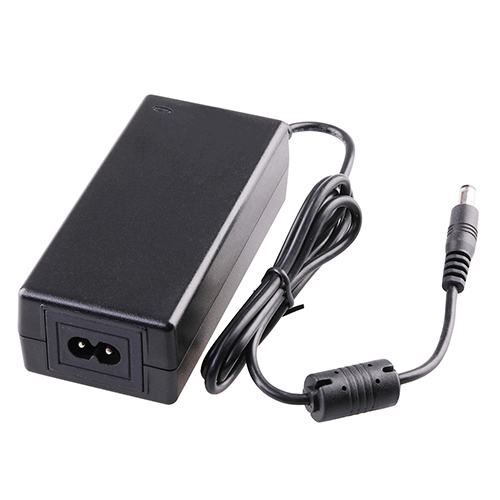
First, perform these basic checks:
-
Inspect the Physical Connection: Ensure the adapter is firmly plugged into both the wall outlet and your computer’s DC-in port. Try a different outlet to rule out a power strip or socket issue.
-
Examine for Physical Damage: Carefully check the entire length of the cable, the adapter brick, and the connector tip for any fraying, cuts, or burn marks.
-
Check for Indicator Lights: Many adapters and laptops have a charging LED. If it’s off or blinking abnormally, it points to an adapter or power supply issue.
If basic checks don’t help, the problem may be with the adapter’s compatibility or output. A genuine Starwell Desktop Power Adapter is engineered to match your device’s exact requirements. Here’s what to verify:
Key Parameters to Check in Your Adapter:
-
Output Voltage (V): Must match your computer’s requirement exactly (e.g., 19.5V). Incorrect voltage can prevent charging.
-
Output Current (A): The adapter’s amperage should meet or exceed the computer’s specification.
-
Connector Tip Size and Polarity: The barrel connector must fit perfectly and have the correct positive/negative pin configuration.
For example, compare a generic adapter’s specs to a Starwell equivalent:
| Specification | Generic Adapter (May Cause Issues) | Starwell Desktop Power Adapter (Optimal Compatibility) |
|---|---|---|
| Output | Listed as 19V | Precise, stable 19.5V as per OEM spec |
| Connector Fit | Loose or wobbly connection | Perfect-fit connector with secure insertion |
| Safety Certifications | Often missing or fake | UL, CE, RoHS certified for guaranteed safety |
Desktop Power Adapter FAQ
Q: Can a faulty Desktop Power Adapter damage my computer?
A: Yes. An unstable or poorly regulated adapter can deliver incorrect voltage or power surges, potentially harming your computer’s motherboard or battery. Using a certified adapter from a trusted brand like Starwell is crucial for safety.
Q: How can I tell if the problem is my adapter or my computer’s charging port?
A: Gently wiggle the connector in the port. If the charging light flickers only at a specific angle, the port may be loose. The most definitive test is to try a known-working compatible Desktop Power Adapter, such as a Starwell replacement, on your computer.
Q: Are all Desktop Power Adapters with the same voltage interchangeable?
A: Not safely. While voltage must match exactly, the connector tip size/polarity and adequate current (amps) are equally important. Always verify all specifications or use a configurable universal adapter designed for safety.
Don’t let a failing power adapter disrupt your work or productivity. If your current unit is damaged or underperforming, it’s time for an upgrade you can trust. Starwell provides high-efficiency, rigorously tested Desktop Power Adapters that deliver stable power and complete peace of mind.
Contact us today for a personalized recommendation and find the perfect, reliable Starwell Desktop Power Adapter for your system!