
China Mid-Diameter Fiber Fusion Splicer: A Practical Guide for Technicians
2026-10-31
Few tasks on a fiber optic job site demand more patience than splicing mid-diameter fibers by hand. One wrong alignment, a fraction of arc mistimed, and you are backtracking through your cable tray wondering where the dB budget went. This guide strips away the guesswork. Built around real field conditions and the kind of problems manuals tend to skip, it walks you through setup, calibration, and troubleshooting for China mid-diameter fiber fusion splicers. We also look at how DVP machines handle the quirks of mid-diameter glass without turning every splice into a science project. If you are a technician who would rather fix the splice than argue with the splicer, read on.
What Technicians Need to Know Before Splicing Mid-Diameter Fiber
Before touching the cleaver, measure the actual outside diameter with a micrometer or calibrated jacket stripper. Mid-diameter fiber often sits between 200 µm and 230 µm, so standard 250 µm holders and stripper grooves will either slip or crush the glass. Swap out the fiber holders on the fusion splicer and use stripping tools sized for the reduced coating, not the old “close enough” pair from the truck.
The cleave length usually needs to be shortened by 1–2 mm compared to a standard 250 µm fiber because the reduced cross-section transfers less axial force before buckling. Set the cleaver to its mid-diameter insert or adjust the anvil position, then run three test splices on scrap fiber to confirm the estimated loss stays below 0.02 dB. Don't trust the splicer’s auto-select program; manually pick the mid-diameter profile if it isn't already loaded from the manufacturer’s update menu.
Protection sleeves also behave differently. A standard 60 mm heat-shrink tube can leave a void at the stripped boundary if the coating steps down too sharply. Use the shorter or smaller-bore sleeves recommended for reduced-cladding fiber, and lower the oven temperature by 10–15 °C on the first attempt to avoid bubbling the thinner acrylate. Inspect the splice under magnification before it goes in the tray, because a kink near the heat-shrink edge won't show up on the OTDR until the customer is already complaining about intermittent loss.
Reading the Machine Before You Touch the Fiber
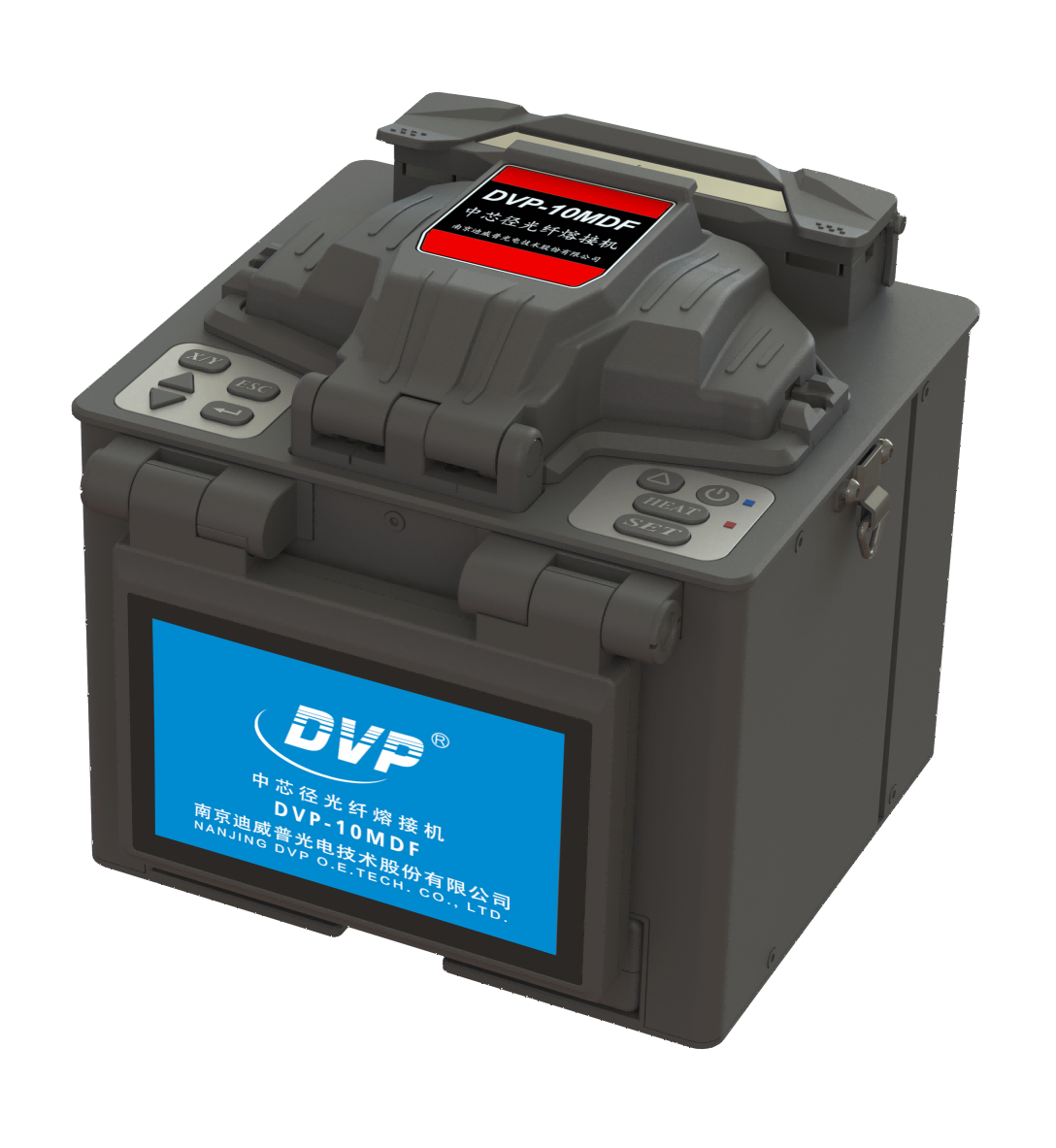
Before you reach for the fiber, take a moment to actually look at the machine. The readouts, indicator lights, and even the subtle hum of the drive system tell you more than a manual ever will. If the tension gauge is nudging past its normal band or the feed rollers hesitate for a fraction of a second, that is the equipment telling you it is not ready for contact. Many snags and breaks happen because someone ignored a warning that was already visible on the panel.
Develop a quick scan pattern every time you approach. Check the pressure readout first, then the speed setting, then the alignment markers along the guide path. Feel the casing for unusual heat before your fingers ever brush the fiber strand. The machine's own feedback—whether a blinking amber LED or a changed pitch in the spindle—gives you a head start. Once you learn to read these signals, you stop reacting to problems and start preventing them.
It also helps to compare what you see to what you expected from the last run. A slight drift in temperature or a new scratch near the fiber inlet can warn of a bigger issue building inside. Take the extra three seconds to verify the state of the equipment. When the readings look stable and the motion is smooth, then you can touch the fiber with confidence.
Prepping and Cleaving Mid-Diameter Fiber Without the Fight
Mid-diameter fiber sits in an awkward middle ground: too thin to manhandle like 400 µm, too thick to treat like 80 µm. The coating often fights you, and a less-than-perfect cleave turns a routine splice into a rework session. Start by using a thermal stripper rather than mechanical blades. Heat softens the acrylate evenly without nicking the glass, which is the usual cause of low-strength points that snap during cleaving. Let the stripper dwell for a second longer than the spec sheet suggests; most hand fatigue comes from rushing this step.
For cleaving, forget the idea that more tension equals a cleaner break. On mid-diameter fiber, a moderate, steady pull with a well-calibrated cleaver does more than brute force. Keep the fiber guides clean and replace the blade before you see visible chips—by then it has already been dull long enough to produce angled faces. If you are working with a hand cleaver, anchor your wrist on the bench and let the tool do the work. A little isopropyl alcohol on a lint-free wipe before cleaving removes any residual coating dust and keeps the mirror face clean.
A Field-Ready Splicing Sequence That Skips the Guesswork
Most splice failures don't come from worn cleavers or dirty v-grooves. They come from hesitation. A field-ready splicing sequence removes that hesitation by fixing the order of operations before the first fiber is ever stripped. You stop wondering whether the heat shrink should go on now or later, or if the cleave length has drifted because the last tech eyeballed it. Each move follows the one before it, so the splice is built the same way at 7 a.m. in a muddy handhole as it is at 4 p.m. on a rooftop.
The sequence starts with bare fiber prep: strip, clean, cleave to a set mark, and load the holder without touching the glass. Then the splice protector is staged on the tray, not in your pocket. The machine handles alignment, but the operator handles the only two variables that actually change results: cleave quality and fiber seating. By making those steps non-negotiable and visually checkable, the sequence turns a finicky process into a short checklist you can run on autopilot without losing accuracy.
That matters when a crew is under pressure to restore service or meet a cutover window. Instead of troubleshooting a bad splice by re-cleaving both ends and hoping, the tech walks back through the same fixed sequence and finds the break in the chain. The result is fewer rework loops, less wasted fiber, and a splice trailer that doesn't become a bottleneck. Field-ready doesn't mean fancier gear; it means a sequence people can repeat when the weather, the light, and the schedule are all working against them.
When Good Splices Go Bad: Tracking Down Loss and Alignment Issues
You've measured the splice tray three times, stripped the coating cleanly, and fused the fibers with textbook precision. Yet somewhere down the line, the power meter tells a different story. Loss creeps in where you least expect it, and alignment feels more like a guess than a guarantee. The first place to look isn't the splice itself, but the mechanical reality around it—microbends from a slightly oversized heat-shrink sleeve, a cleave angle that looked fine under the magnifier but wasn't quite 90 degrees, or that one buffer tube that shifted just enough to pull tension on the joint. Loss rarely announces itself with a dramatic crack. It hides in the tolerances you assumed were good enough.
Alignment troubles often show up as a slow degradation instead of a sudden failure. A splice that passes initial OTDR testing can still develop problems weeks later, once the enclosure is closed and temperature swings begin their quiet work. The fiber expands, the splice sleeve contracts, and what was a clean butt joint becomes a microscopic gap or a lateral offset. If you're chasing intermittent loss, try re-entering the enclosure and watching the live power reading while you gently flex the incoming cables. A stable splice shouldn't care about a little movement. A bad one will flinch. That flinch tells you the stress was always there, just waiting for the right bend radius to make it visible.
Some of the most stubborn alignment issues come from mixing fiber types or ignoring core eccentricity. Two fibers can pass a visual alignment check yet sit far enough off-center to scatter light at the fusion point. Don't trust the machine's default estimate. After splicing, run a bidirectional OTDR trace and compare the event loss from both directions. A real splice loss should look similar in each direction; a large difference usually means you're seeing a ghost or a misalignment artifact. And when you do find the culprit, fix the cause rather than re-splicing the symptom. Clean the V-grooves, recalibrate the arc, and make sure the fiber holders aren't worn. The splice is only as good as the hardware that makes it.
Keeping the Splicer Dependable Through Dust, Heat, and Heavy Use
A splicer that chokes on a little grit or starts drifting after an hour in the sun isn't much use on a roadside cabinet install. That's why the internal chassis is sealed with gaskets at every opening, and the fiber alignment stages sit behind a secondary dust shield. Even when wind kicks up fine silica or dry soil, the optics stay clear enough to hold a consistent loss reading without constant cleaning.
Heat is handled less with fans and more with deliberate airflow paths. The main board and power supply are placed away from the heating tray, and the tray itself cycles down in stages instead of dumping residual warmth into the housing. That keeps the screen and battery from throttling during back-to-back splice sessions in direct sunlight, which is when cheaper units start to lag or shut down.
Heavy use shows up in the small things: the clamp levers, the tube heater latch, the electrode rods. These are built with wider tolerances and replaceable wear pads, so a crew can run a few hundred splices a week for months before anything feels loose. It's not flashy engineering, just the kind of dependability that keeps a splicer on the truck instead of in a repair box.
FAQ
It generally covers fibers with cladding diameters from about 80 µm to 150 µm, though many units also work with standard 125 µm fiber if you select the matching profile. These fibers show up in specialty sensing, medical light guides, and some older industrial cabling, so you cannot assume a default single-mode setting will be correct.
First, inspect the V-grooves and electrodes for shipping damage or debris. Second, power the splicer on and run the built-in self-test with a known good fiber sample. Third, confirm the firmware version and fiber profile library match the fibers you expect to splice. Rushing this stage is the main reason a new machine gets blamed for bad splices.
The imaging and alignment routines are tuned to a specific cladding diameter. If the actual fiber is smaller, the camera may interpret the core position incorrectly; if it is larger, the fiber may not seat fully in the V-groove. Always select a profile close to the real diameter instead of forcing a standard profile.
Look for pitting, a dull gray tip, or an arc that swings sideways during discharge. If the electrode gap has widened beyond the spec in the manual, or you see sudden splice loss jumps even after cleaning and calibration, replacement is overdue. Many technicians log arc count and swap electrodes at around 2,000 to 3,000 discharges rather than waiting for visible failure.
Reclean the fiber with lint-free wipes and fresh alcohol, then make two or three test cleaves to check cleaver blade condition. If the errors persist, reduce the arc power slightly or increase the overlap setting by one step in the fiber profile. A bubble usually means too much heat, while a neck often points to insufficient cleaning or a dull cleaver.
Yes, cold electrodes produce a cooler arc for the same power setting, and the fiber coating may become stiffer, which affects clamping. Let the splicer sit powered on for about ten minutes before the first splice so the internal temperature stabilizes. If you work below freezing, keep a spare fiber holder inside your jacket so it is not ice-cold when you load it.
It is better to remove them. Dust and moisture trapped under the holders can settle into the V-grooves and cause alignment errors the next morning. If you must leave them on, place a fresh desiccant pack in the case and run the cleaning routine before the first job.
Check that the sleeve inner diameter is not too tight for your fiber diameter and that the metal strength member sits flat in the heater groove. Run a test splice and gently flex the completed sleeve before relying on it in the field. A sleeve that is too narrow can crack the splice or prevent the heater lid from closing fully.
Conclusion
Working with mid-diameter fiber on a Chinese fusion splicer isn't about memorizing settings—it's about learning how the machine thinks. Before you ever load a strand, check the alignment mode, electrode condition, and arc calibration history. Many loss problems trace back to technicians ignoring the splicer's own diagnostic messages or assuming yesterday's parameters still hold. Read the display, not just the fiber. When cleaving, keep the blade pressure moderate and the fiber guides clean; mid-diameter fiber is stiff enough to fracture unevenly if you rush the prep. Let the cleaver do the work instead of forcing the handles.
A field-ready splicing sequence means staging your tools, verifying the V-groove alignment with a sacrificial fiber, and watching the arc duration on the first splice rather than trusting the default. If loss spikes, separate the causes: check for debris in the V-groove, a dull cleaver wheel, or electrode misalignment before blaming the fiber itself. High humidity and dust shorten electrode life, so clean after each job and keep the windshield closed during windy conditions. Regular arc calibration, not just occasional cleaning, keeps Chinese mid-diameter splicers dependable through heavy use. The goal isn't a perfect spec sheet—it's consistent splices that survive the next pull test.
Contact Us
Contact Person: Mr XU
Email: [email protected]
Tel/WhatsApp: 86-25-85582828
Website: https://www.dvp.cn/en/